Crude: A Bold Font with a Purpose
Crude is more than just a font—it’s a design choice that speaks to authenticity, creativity, and a touch of rebellion. Its rough, hand-rendered style brings a sense of imperfection that feels real and human. For designers, creatives, and professionals who value originality and personality in their work, Crude offers a unique way to stand out without sacrificing clarity or functionality.
Understanding Crude and Its Place in Design
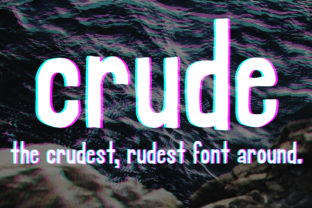
Crude is a fun and bold font designed to capture the essence of raw, organic typography. Unlike sleek, highly stylized fonts, Crude embraces the irregularities and inconsistencies that come from hand-drawn elements. This makes it particularly well-suited for projects where a tactile, unpolished aesthetic is desired.
The font's character set includes a range of uppercase and lowercase letters, along with numerals and punctuation marks. Its versatility allows it to be used across various mediums—print, digital, web, and even physical signage. Whether you're designing a logo, creating a website, or producing marketing materials, Crude can add a distinctive visual flair that sets your work apart.
Where Crude Fits in the Creative Process
Crude can be integrated at different stages of a project, depending on the goals and needs of the design. Here are some common use cases:
- Before a Project: Use Crude to sketch out ideas, create mood boards, or draft initial concepts. Its bold nature helps draw attention to key elements and encourages creative thinking.
- During a Project: Incorporate Crude into wireframes, mockups, or prototypes to test how text interacts with other design elements. It can also serve as a visual anchor in branding or user interface design.
- After a Project: Apply Crude to final deliverables such as presentations, reports, or promotional materials. It adds a memorable and engaging touch that resonates with audiences.
Its ability to adapt to different phases of a project makes Crude a valuable tool for anyone looking to maintain a cohesive and expressive design language throughout their workflow.
Working with Crude: Tools and Compatibility
Crude is designed to be compatible with most modern design software and platforms. It supports both desktop and web environments, making it accessible for a wide range of users. Here are some popular tools where Crude performs well:
- Adobe Photoshop: Ideal for print and digital design, Crude works seamlessly with layers and effects.
- Adobe Illustrator: Perfect for vector-based designs, allowing for scalable and high-quality output.
- Figma: Great for collaborative design workflows, especially when working with teams or clients.
- Canva: Suitable for quick, no-code design tasks, offering easy integration with Crude’s character set.
- Web Browsers: Crude can be embedded directly into websites using HTML and CSS, ensuring consistent rendering across devices.
When working with Crude, it’s important to consider font pairing. While its bold and imperfect nature stands on its own, combining it with cleaner, more structured fonts can create a balanced and professional look. This approach is especially useful in branding or user interface design where hierarchy and readability are key.
Practical Implementation Tips
Integrating Crude into your workflow requires some planning and consideration. Here are a few practical tips to help you get started:
- Start Small: Experiment with Crude in smaller projects first to understand how it fits with your existing design style.
- Test Readability: Ensure that Crude is used in contexts where legibility remains a priority. Avoid using it for long body text unless the design intent supports it.
- Use It Strategically: Apply Crude to headlines, titles, or call-to-action buttons where its boldness can make an impact.
- Organize Your Assets: Keep Crude files organized within your design library so they’re easily accessible during future projects.
- Stay Consistent: Maintain a consistent use of Crude across all relevant materials to reinforce brand identity and visual cohesion.
By following these steps, you can ensure that Crude enhances rather than hinders your design process. Its imperfections become strengths when used thoughtfully and intentionally.
Real-World Use Cases
Crude has found a place in a variety of industries and applications. Here are a few examples of how it can be used effectively:
- Branding: Crude can be used in logos, taglines, and packaging to convey a sense of authenticity and craftsmanship.
- Marketing: In social media posts, email campaigns, and advertisements, Crude adds a dynamic and eye-catching element.
- Education: Teachers and educators can use Crude in presentations, lesson plans, or handouts to engage students with a more visually stimulating format.
- Freelancing: Freelancers can incorporate Crude into proposals, contracts, and portfolio materials to showcase their personal brand.
- Small Business: Entrepreneurs and small business owners can use Crude to create a unique and memorable brand presence across multiple channels.
Each of these use cases highlights how Crude can be tailored to fit specific needs while maintaining its core identity as a bold and expressive font.
Long-Term Integration and Quality Control
For those looking to use Crude consistently over time, it’s important to establish quality control measures. This includes:
- Font Licensing: Ensure that you have the appropriate license for commercial use if needed.
- Version Management: Keep track of different versions of Crude to avoid confusion and maintain consistency across projects.
- Feedback Loops: Gather feedback from clients, users, or team members to refine how Crude is applied in different contexts.
- Backup and Storage: Store Crude files securely and back them up regularly to prevent data loss.
By implementing these practices, you can ensure that Crude remains a reliable and effective part of your design toolkit for years to come.